
This solution leverages the startup command setting and Application Settings for Linux Azure App Service to both instrument the back-end application such as Java, Node, .NET Core, Python.
It involves two steps
1. Set Atatus configuration In Environment variables 2. Add Atatus wrapper in startup command
1. Set Atatus configuration In Environment variables
To instrument your application, begin by adding the following values under App Services -> Settings -> Environment variables in your Azure app settings.
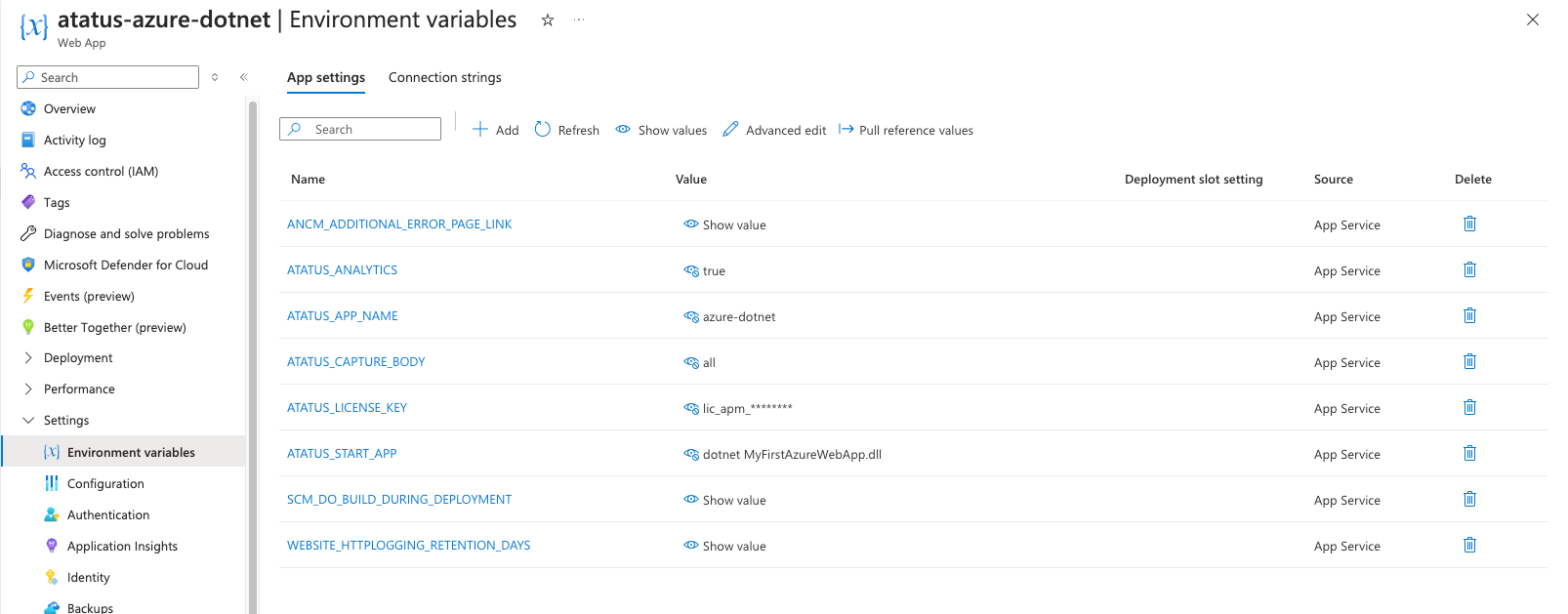
Environment Values
ATATUS_START_APP - Startup Commands for your applications, see below
ATATUS_APP_NAME - Name of your project/app/service.
ATATUS_LICENSE_KEY - APM License Key of your Atatus account.
ATATUS_ANALYTICS - (optional) App Analytics collects all requests individually with contextual data. Possible values are true, false
ATATUS_TRACING - (optional) Enables distributed tracing, capturing spans for the full request path (database calls, outbound HTTP, templates). Possible values are true, false. Defaults to false.
ATATUS_CAPTURE_BODY - (optional) This setting allows for capturing the body in API analytics. Possible values are all, request, or response.
ATATUS_ENVIRONMENT - (optional) The environment this app runs in, used to separate data in the dashboard. e.g. production, staging.
ATATUS_DOTNET_PROFILER_VERSION - (optional, .NET Core only) Pins the Atatus .NET profiler version used to instrument the app.
ATATUS_PHP_AGENT_VERSION - (optional, PHP only) Pins the Atatus PHP agent version used to instrument the app.
ATATUS_PYTHON_AGENT_VERSION - (optional, Python only) Pins the Atatus Python agent version used to instrument the app.
ATATUS_JAVA_AGENT_VERSION - (optional, Java only) Pins the Atatus Java agent version used to instrument the app.
Startup commands for different backend languages
| Runtime | ATATUS_START_APP | Description |
|---|---|---|
| Node.js | node ./bin/www | Runs the Node your script file, or PM2 configuration file. |
| .NET Core | dotnet myApp.dll | Ensure that the .dll file name specified in the command matches the actual name of your .dll file. In some situations, this may differ from your Web App’s name.. |
| Java | java -jar /home/site/wwwroot/app.jar | The command for starting your app. This is not needed for applications running in Tomcat. |
| Python | gunicorn --bind=0.0.0.0 --timeout 600 app:app | The command that starts your WSGI/ASGI server. Django: gunicorn --bind=0.0.0.0 --timeout 600 myproject.wsgi. FastAPI: uvicorn --host 0.0.0.0 --port 8000 main:app. |
2. Add Atatus wrapper in startup command
Node.js & .NET Core
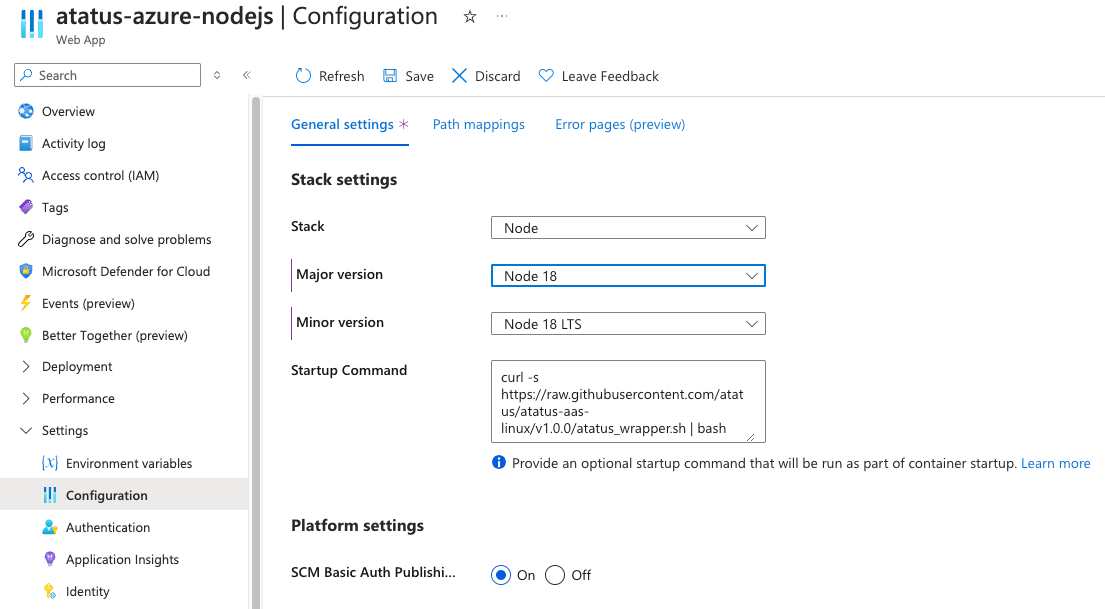
Go to App Services -> settings -> Configuration and add the following to the Startup Command field:
curl -s https://raw.githubusercontent.com/atatus/atatus-aas-linux/v1.0.0/atatus_wrapper.sh | bash
Python
Go to App Services -> settings -> Configuration and add the following to the Startup Command field:
curl -s https://raw.githubusercontent.com/atatus/atatus-aas-linux/v1.0.0/atatus_wrapper.sh | bash
The wrapper installs the Atatus Python agent and runs your application through atatus-run, which instruments Django, Flask and FastAPI/Starlette automatically. No code changes are required in your application.
Java
Download the atatus_wrapper file from the releases and upload it to your application with the Azure CLI command:
az webapp deploy --resource-group <group-name> --name <app-name> --src-path ./atatus_wrapper.sh --type=startup
Once Startup Command added in your settings, you need to restart your application from azure app service.
 +1-415-800-4104