

Serverless Framework
-
Install
serverlesspackage -
Navigate to Atatus Dashboard —> Settings —> Account Settings —> API Keys. You can generate a new API key (select - Ingest License Key). After obtaining the API key, you’ll need to set it in the
serverless.yamlfile under the environmentATATUS_LICENSE_KEY(see step 3). -
Add Lambda layers to your
serverlessprovider configuration
Layers Syntax:
arn:aws:lambda:<region>:317265140635:layer:Atatus-Python:<version>SAM Template
- Install AWS SAM CLI
-
Navigate to Atatus Dashboard —> Settings —> Account Settings —> API Keys. You can generate a new API key (type - Ingest License Key). After obtaining the API key, you’ll need to set it in the
serverless.yamlfile under the environmentATATUS_LICENSE_KEY(see step 3). -
Add Lambda layers to your
SAMprovider configuration
Layers Syntax:
arn:aws:lambda:<region>:317265140635:layer:Atatus-Python:<version>AWS Console
1. Add Atatus Layer to Your Lambda Function:
- Navigate to the AWS Management Console.
- In the search bar at the top, type
Lambdaand select the Lambda service from the drop down. - Select the function you want to modify.
- In the Function overview section, click on
Layers. - Once you are in the Layers section, click on the
Add a layerbutton. - Select “Specify an ARN” as Layer source and enter the following ARN
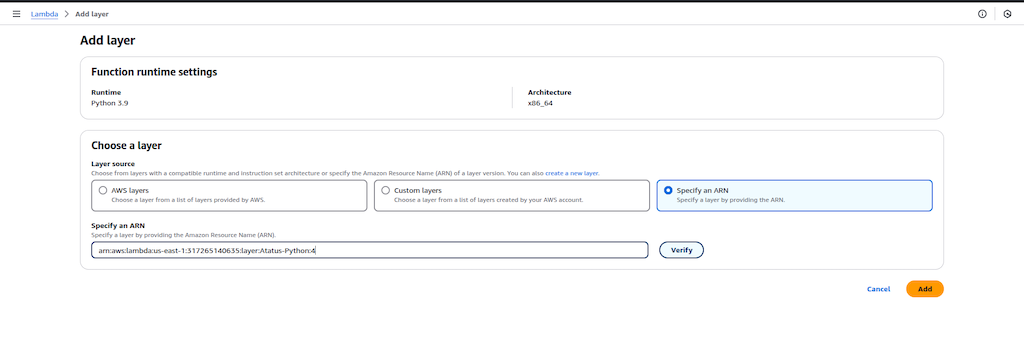
- After entering the ARN, click the Add button to associate the specified layer with your Lambda function.
2. Configure Agent Environment Variables:
- Still in your Lambda function configuration page, scroll down to the
Configurationtab. - Within the Configuration tab, Click on
Environment variables. - To set the agent environment variables, click the
Editbutton. - You can now set following environment variables
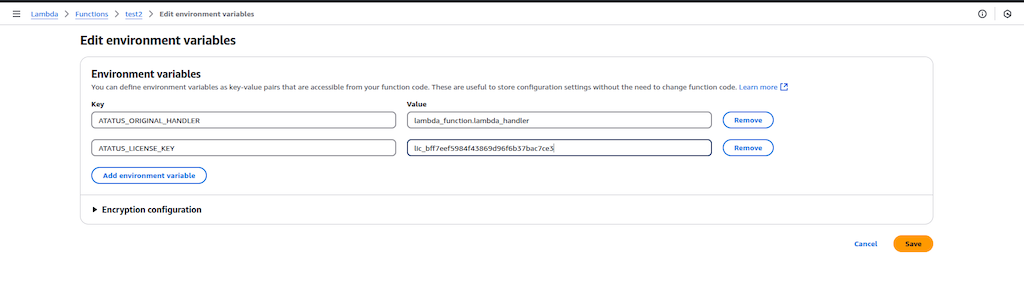
3. Update Atatus Handler in runtime settings
- In your Lambda function configuration page, scroll down to the
Codetab. - Within the Code tab, Click on
Runtime settings. - To set the agent handler, click the
Editbutton. - You can now set handler as follows
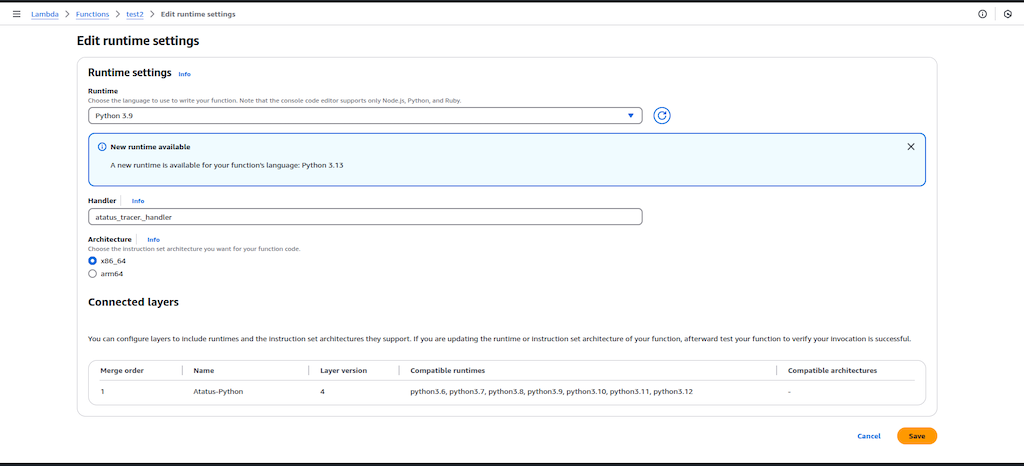
- Click the Save button to save the changes.